
Appliance Repair Van Graphics
Appliance repair van graphics should tell customers who is arriving and which business to contact. The layout also needs an accurate decision about service categories and any manufacturer relationships. Start with the work your company actually performs, then adapt a concise identity to the real van. Avoid turning a useful service vehicle into a crowded directory of appliance logos, unsupported authorizations and temporary phone numbers.
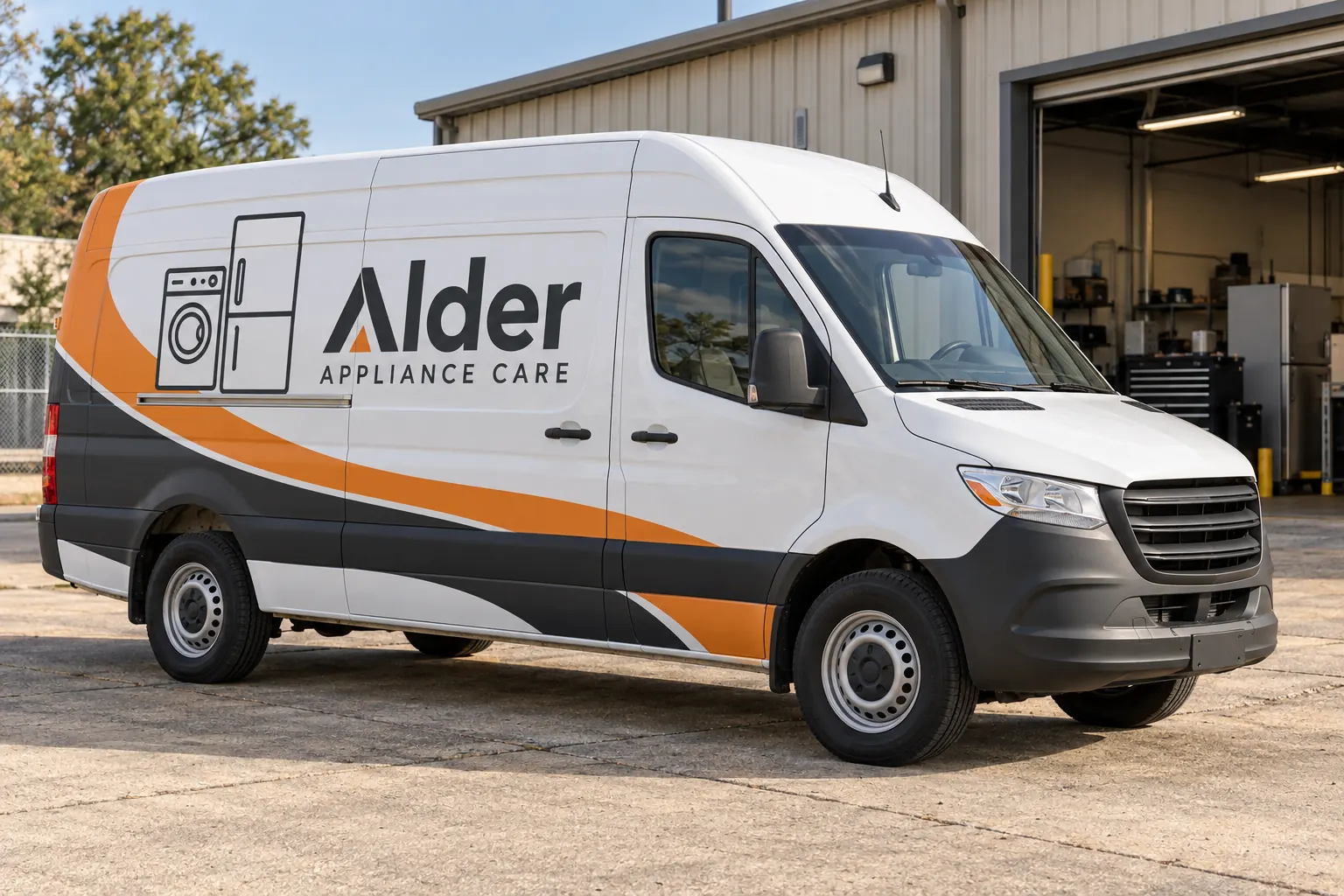
Original fictional commercial planning concept; not a completed customer installation.
Choose the customer question the van should answer
Decide whether the primary message is general appliance repair, a defined commercial service or another approved specialty. Use the business’s current wording rather than a long list gathered from old advertising. The customer should be able to recognize the company and understand the next contact action without sorting through several competing service categories.
If your company has separate residential and commercial teams, identify whether the vehicles need different descriptors or one shared identity. Confirm that decision with the team handling bookings. Keep service promises, coverage claims and response wording tied to actual operating policy. A design should communicate the business accurately, not create an offer that the service desk has to explain away.
Make manufacturer claims an approval item
A company may service appliances from many manufacturers without holding a specific authorized relationship with all of them. Before adding any product brand logo or authorization wording, provide current approved assets and confirmation of the permitted use. Assign the review to the business contact responsible for those relationships. Do not infer permission from an old magnet or a previous supplier’s rendering.
Keep the business identity understandable even if third-party marks are omitted. A clear company name, accurate category and approved contact route can do the essential work. If relationships change, the fleet file should show which units carry affected marks so the business can decide what needs updating rather than reproducing an obsolete claim on the next van.
Use appliance imagery as a supporting cue
A small set of relevant symbols or a restrained visual theme can help explain the service category. Decide whether that visual cue adds clarity or merely consumes space needed for the name and contact action. Avoid treating a large catalog of appliance pictures as a substitute for a strong hierarchy. Keep the selected imagery consistent across the approved body versions.
The fictional Alder Appliance Care concept uses simple washer and refrigerator outlines with a limited orange and charcoal palette. It illustrates one possible design direction and does not imply a customer installation or manufacturer affiliation. Your own image choices should follow the business’s services, brand assets and the actual available panels on the van.
Survey the van with doors and hardware in mind
Provide current photographs of both sides, front and rear, plus details of existing graphics, windows, handles and exterior accessories. Identify the precise body configuration and any known repairs or condition concerns. If side doors are central to daily loading, explain that use so the proof can be reviewed with the relevant panel divisions in mind.
Consider the rear as a separate composition. Hinges, door splits and any window area can change how the name or contact line reads. Ask the supplier to assess the actual vehicle rather than copying a stock van silhouette. A model name helps identify the vehicle, but it does not establish its current equipment, paint history or exact graphic condition.
Choose a contact route that stays current
Use the business-approved booking or inquiry destination. Confirm the exact phone number or web address from one controlled source and check every occurrence on the proof. If different branches use different details, identify the affected units and avoid mixing them in a shared artwork file. Keep temporary technician contacts out of the permanent master unless the business has deliberately approved that approach.
Decide how changes will be handled before they occur. A reassigned van may need a contact variation without changing the core identity. Record the wording version and unit reference so a small update does not trigger uncertainty about every panel. The goal is a controlled public message that another buyer can understand later.
Compare identification and broader coverage fairly
Ask for defined coverage options that match your vehicle list. A lettering package, a partial design and broader coverage need clear descriptions of the included areas and artwork work. Identify existing graphic removal, relevant condition assessment and installation arrangements. Compare the whole scope rather than assuming the largest image or lowest total represents the same work.
If the company operates compact vans and high-roof vans, state both configurations and their quantities. Ask which adaptations are included. A common design direction can produce several approved body versions. Keep that distinction visible in the quote and the artwork archive so new vehicles do not inherit the wrong proportions or an outdated rear contact line.
Release vehicles around actual appointment commitments
Explain the service schedule and who can authorize taking each van out of normal use. Provide preferred windows and fixed constraints, then ask the provider to assess the job arrangement. Keep any tentative date subject to the real dependencies, including approved artwork, vehicle readiness and the agreed scope. Do not assume a particular turnaround from a generic online example.
If a van is being fitted out, repaired or reassigned, list those changes. The project contact should know which vehicle will actually arrive and whether its exterior configuration has changed since the survey. Record the unit reference at handoff so a substitute van is not processed against another vehicle’s proof without a deliberate review.
Keep the next reorder simpler than the first
Retain the final approved files, the actual service wording source and the unit list. Identify which marks and contact variants are active. Add current photographs when a vehicle is repaired or equipment changes. For a replacement panel, send the affected area and the appropriate artwork reference rather than a screenshot of a van seen across a parking lot.
For a Pelican Wraps inquiry, include vehicle details, photographs, approved business assets, desired coverage and operating constraints. State whether you want one van or a repeatable fleet program. Use the broader van and fleet pages for general choices, while making appliance-service wording and affiliation decisions explicit in this more focused project brief.
Frequently Asked Questions
Take the Next Step with a Clear Project Brief
Continue with the resource that matches your next decision:
Send the actual vehicle or surface photographs, quantities, approved brand files, requested coverage and timing constraints. Identify open questions so the project review can address your equipment and business needs.
