
Auto Dealership Fleet Graphics for Delivery and Courtesy Vehicles
A dealership support fleet can carry a clear business identity across parts vans, courtesy SUVs and other operational vehicles. Organize approved dealer assets, body-specific layouts and unit records so the fleet stays consistent as vehicles are added, reassigned or replaced.
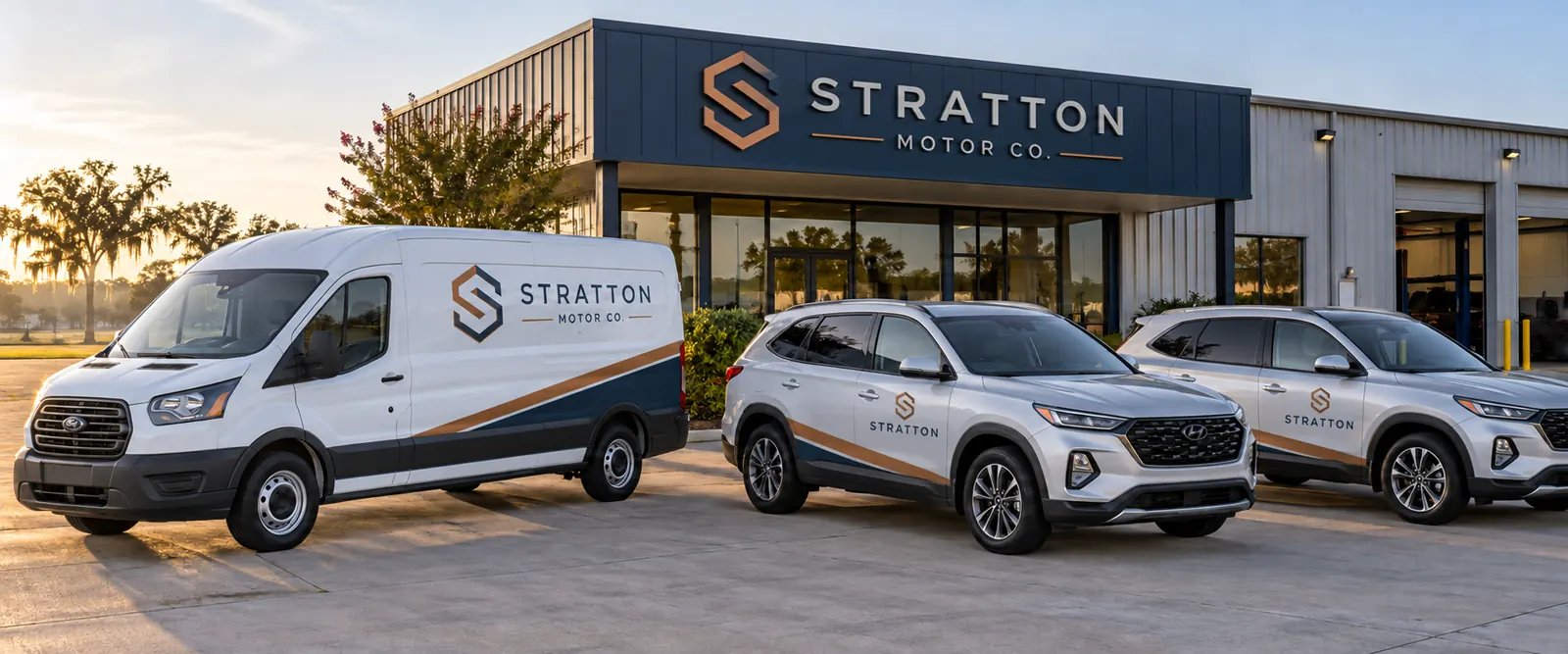
Fictional commercial wrap design concept; not a completed customer installation.
Define the dealer identity and each vehicle's role
Start with the business name and the role the vehicle needs to communicate. Parts delivery, courtesy transport, service support and administrative use can call for different wording. Keep the operator recognizable without turning the vehicle into a dense sales advertisement or a list of every department.
Choose the contact route appropriate to that role and verify it internally. A parts enquiry route may differ from service bookings or the general website. Give the approved information a clear hierarchy. The layout should support the actual dealership business rather than introduce a warranty, affiliation or service promise not established by the brief.
For a mixed support fleet, record the role and contact route beside each unit in the vehicle list. A parts van can then use the approved delivery identity while a courtesy SUV carries a simpler business reference. This gives the reviewer a concrete reason for each variant and helps a reassigned vehicle receive the right wording before new graphics are ordered.
Use authorized dealer and manufacturer assets
Supply the current logo sources, colors, naming conventions and any applicable fleet identity standards. If manufacturer or partner assets are requested, provide the approval and source package relevant to their use. Another dealership’s vehicle or a generic automotive image should not replace the actual authorized files.
Identify who reviews dealer identity, any other brand assets and local contact details. Keep the approvals organized against a dated proof. A concept should not imply an authorized relationship or qualification on its own; those details need to reflect the real business and its approved wording.
Inventory parts vans, courtesy SUVs and support bodies
List the exact make, model and configuration for each vehicle version with quantity and current photos. Include doors, windows, trim, badges and accessories that affect the visible panels. Courtesy vehicles can change more often than a long-term work van, so record which units and versions the project actually covers.
Use the delivery-van page, commercial SUV route and vehicle directory for body-specific planning. A shared role or manufacturer name should not be treated as evidence that an earlier production layout fits another vehicle.
Choose coverage around clear daily identification
Lettering can provide a restrained dealer identity while leaving much of the original paint visible. Partial graphics can introduce a recognizable color area, while fuller coverage offers another direction where the surfaces and goal support it. Compare defined options using the same essential wording and actual vehicle photographs.
Review side and rear views separately around handles, door splits, windows and trim. State included panels and exclusions in the scope, including any separate request for glass treatment. The lettering guide and partial-wrap guide help frame that coverage decision.
Plan record ownership as vehicles change roles
Keep approved proofs linked to vehicle identifiers and body configurations. Record whether a unit is for parts delivery, courtesy use or another defined role, and identify who authorizes changes. This helps avoid an outdated contact route or a graphic version intended for a vehicle no longer in that part of the fleet.
Discuss ownership permissions and end-of-use expectations relevant to the actual vehicle arrangement before approval. Do not assume an existing identity resolves every question about a replacement or reassigned unit. The graphics management route connects additions, repairs and changes with a maintained reference rather than an uncertain older file.
Coordinate condition and availability with the operating team
Disclose old vinyl, residue, repairs, peeling finishes and other concerns with close photos. Graphics should not be treated as a repair for an underlying surface issue. Removal, preparation and suitability need review before approval. A recently acquired vehicle should still be assessed against its actual condition and body details.
Identify priority units and release windows, then clarify access, delivery and collection against the confirmed project arrangement. Parts routes and courtesy availability may create different constraints. Use the inventory worksheet to connect vehicles, photographs, condition questions and timing rather than planning around a generic installation duration.
Prepare a dealership fleet graphics brief
Send the vehicle list, quantities, current photos, authorized artwork sources and essential wording. Identify roles, approval owners, coverage preferences, existing information to preserve and timing. Make unknown details visible before the scope is approved, including any manufacturer or partner review requirements that affect the intended identity.
Read the artwork guidelines and request a dealership fleet graphics quote. The parts van and courtesy SUVs shown here use a fictional automotive-business identity. They illustrate a possible coordinated direction without presenting customer installations, dealer authorization, warranties or sales results as evidence.
Frequently Asked Questions
Turn Your Vehicle Details Into a Clear Project Brief
Send current photographs, vehicle quantities, logo files, coverage preferences and timing. Identify old graphics and paint concerns so the project review can address the actual equipment.
Explore planning resources or request your commercial wrap quote.
