
Fleet Franchise Territory Graphics Approval
A franchise vehicle can carry a shared identity and a local descriptor, but those elements need a clear source and a defined scope. This record connects supplied brand instructions to the actual operator, vehicle group and proposed public wording. Use it to prepare a graphics approval request that the responsible franchise and local business contacts can review. It records their instructions; it does not interpret a franchise agreement or determine territory rights.
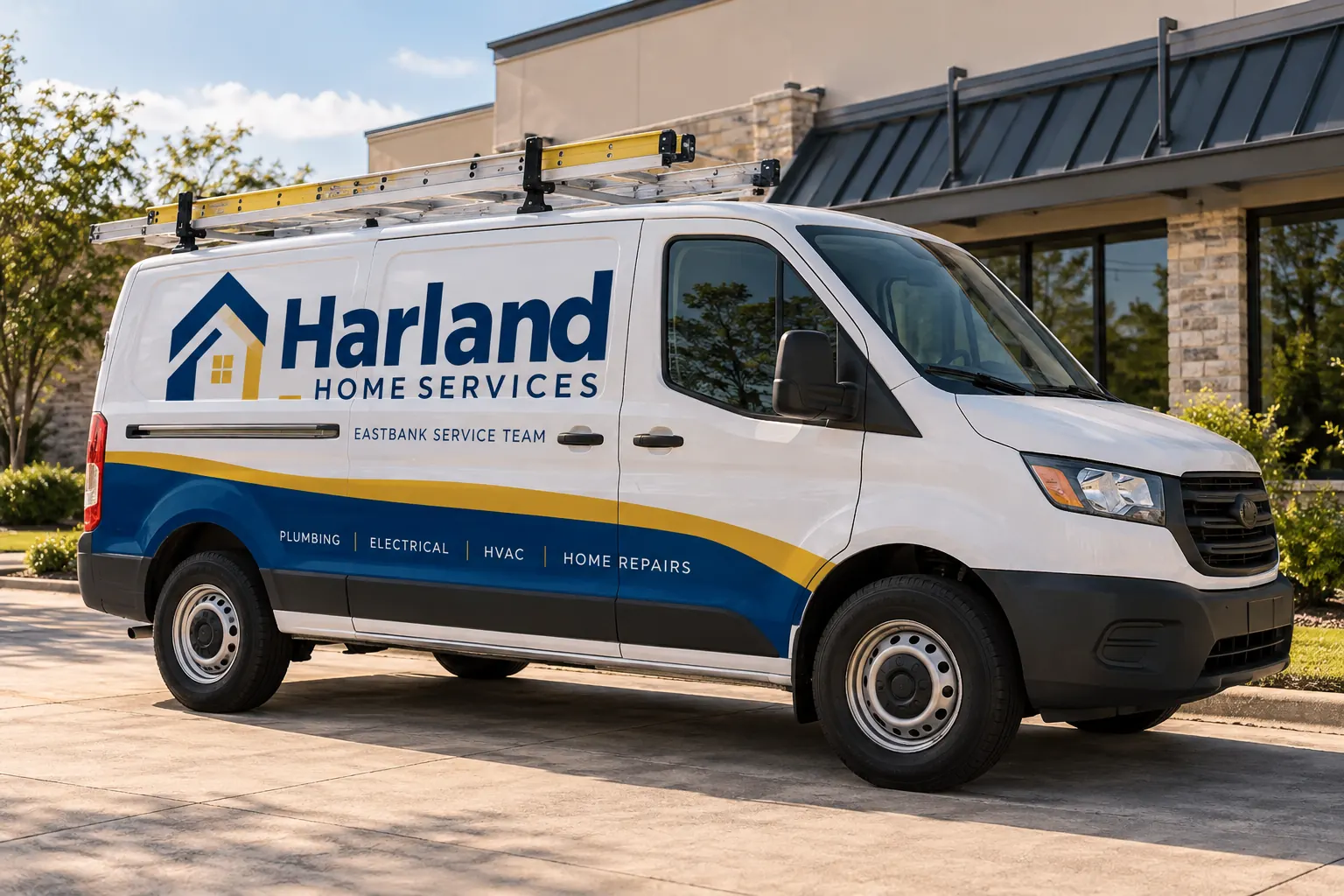
Original fictional commercial planning concept; not a completed customer installation.
Identify the actual operator and requested vehicle group
Start with the business contact coordinating the request and the units or defined group under discussion. Record the actual body configurations and proposed views. Keep the vehicle list distinct from the operating territory description. A unit’s current parking location does not establish what public location wording should appear on it.
Obtain the location or territory descriptor from the responsible business source. Use exact supplied wording rather than shortening a name to make it fit an early concept. If different units use different descriptors, create identifiable groups and name the owner of each instruction. The provider needs a factual map between a vehicle group and its approved message, not an invitation to infer commercial boundaries from a depot address.
Find the current franchise graphics instruction
Request the applicable brand document, approved layout reference and asset package through the business’s normal channel. Record the source, version and contact who can answer questions. Distinguish the shared identity rules from a local suggestion. A photograph of another operator’s van can be a discussion reference without establishing the current instruction for this project.
List the actual requirements supplied for local wording, contact details and identity treatment. If the document does not answer a question, mark it for clarification instead of inventing a restriction or permission. Keep important attachments available to the authorized project participants. The useful package makes current instructions easy to find while preserving the distinction between supplied rules and assumptions made during design.
Build the local-message approval row
Record the exact proposed operator or team wording, public contact route and applicable vehicle group. Identify the person who confirms each item. Ask the responsible business contact to resolve whether a local descriptor is ready for artwork. Keep the question separate from the visual preference for a particular font size or position.
The Harland Home Services illustration uses Eastbank Service Team as a fictional local descriptor. It demonstrates hierarchy, not a real franchise relationship or territory decision. Use your actual supplied names and current business sources. The working record below helps capture the operator, group, brand reference, local copy, decision chain and pending actions without converting the form itself into an approval.
Verify the customer route with the local owner
Ask who controls the number or website destination proposed for the vehicles and who confirms it serves the intended inquiries. Record the exact public copy from that owner. A centrally supplied logo does not establish which local number should accompany it, and a branch preference does not automatically supersede the current franchise instruction.
When the shared brand source and local route differ, identify the specific question for the responsible contacts. Keep routing checks and artwork spelling connected but distinguish their evidence. A correctly typed number may still lead to a team that is not expecting the inquiry. Resolve readiness through the business’s actual process before treating the contact line as released public content.
Present the proposed proof with a decision map
Send the current proof together with the actual group list, brand source and local-message row. Identify what each reviewer needs to confirm. One contact may review brand treatment while another verifies local content. Ask for comments against the same version and consolidate them into a single revision instruction for the designer.
Do not describe a partial response as approval of the complete project. Record which question was answered and which remains pending. If a later revision changes the local descriptor, contact line or group scope, identify the affected source and obtain the relevant review. This preserves the reason for the current layout when a future buyer asks why otherwise similar vehicles carry different local messages.
Control transfers and reassignment changes
Define who reports a unit moving to another team or a change in the approved local message. Record the action needed to review its graphics rather than assuming a physical transfer automatically updates the artwork instruction. Include the current proof and contact-source checks in that review. The visible identity should be compared with the new actual request.
Keep prior group assignments as labeled history where useful. Do not leave two current records directing different descriptors for the same unit. If the reassignment decision is still pending, show that state and its owner. This task is about keeping vehicle and message records aligned; the responsible business parties remain the source for territory, operator and agreement questions.
Send a complete franchise graphics inquiry
Provide Pelican Wraps the actual unit list, current vehicle photographs, supplied franchise brand files, exact local wording, contact sources and decision references. State which questions are pending and identify one coordinating contact. Explain whether you want initial assessment, an adapted proof or another defined project stage, together with the relevant availability and requested timing.
Use the fleet graphics service for commercial scope and the artwork service for asset and layout questions. This record supplies the local approval chain that helps those discussions progress. Keep the final proof reference with the group mapping, and update both when an actual approved change occurs. A clear inquiry prevents a generic franchise logo attachment from becoming an incomplete instruction for every unit in the business.
Draft and Download Your Working Record
Draft your entry, then download a copy before leaving. Send any project decision through the communication process agreed with your supplier.
Frequently Asked Questions
Take the Next Step with a Clear Project Brief
Continue with the resource that matches your next decision:
Send the actual vehicle or surface photographs, quantities, approved brand files, requested coverage and timing constraints. Identify open questions so the project review can address your equipment and business needs.
