
Equipment Owner vs Operator Branding Checklist
Equipment owner and operator branding can involve different people supplying the asset, using it and choosing its visible business message. This checklist creates a practical role-and-message record for one actual graphics request. It identifies who provides each identity, who confirms the relevant project instructions and which unit receives which approved graphic. It does not determine ownership rights or invent authorization. The useful result is an explicit decision trail that the buyer and provider can use instead of assuming that a logo file settles every role.
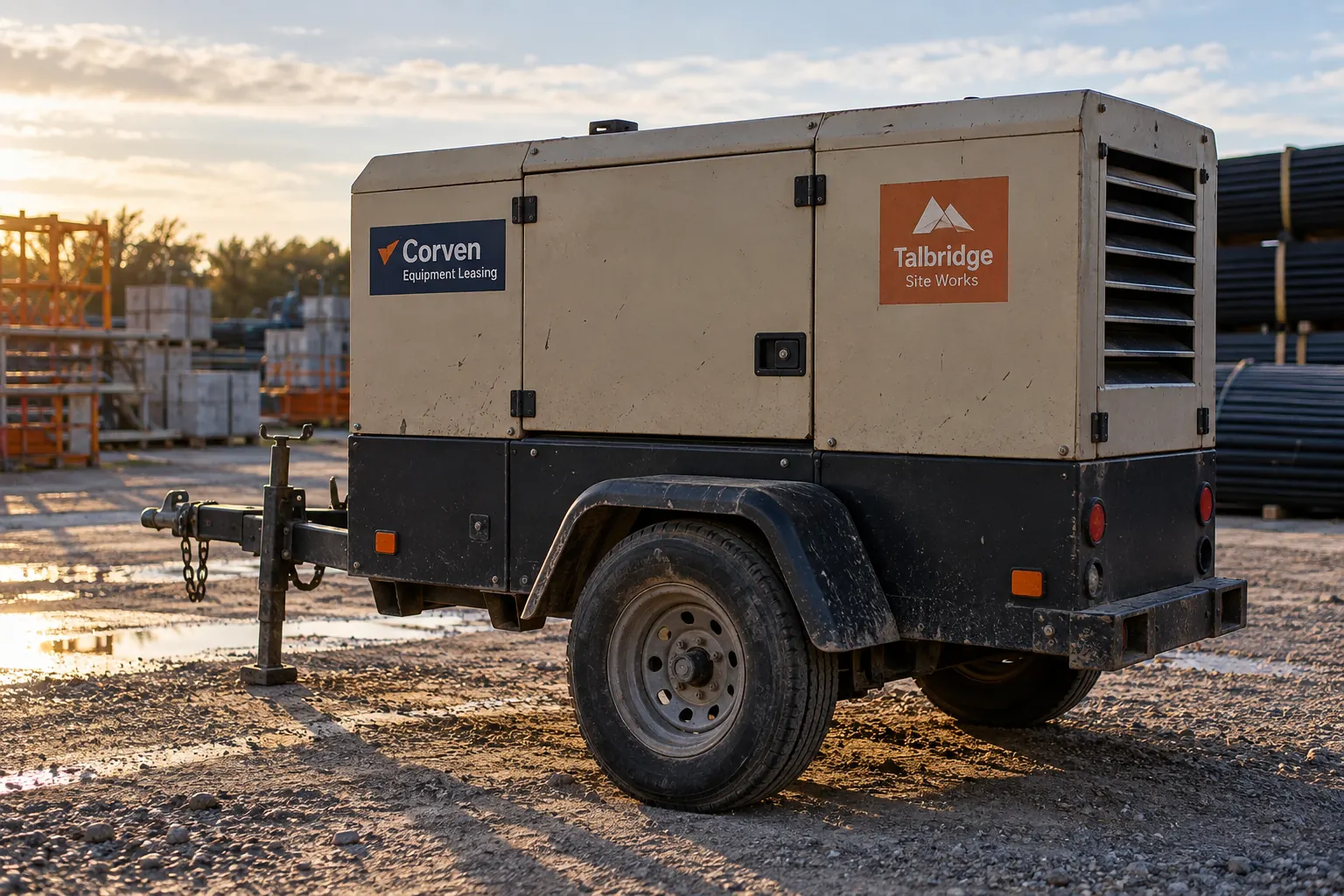
Original fictional commercial planning concept; not a completed customer installation.
Name the actual roles for this equipment request
Identify the actual equipment owner contact, operating business contact and person coordinating the graphics inquiry. Record the unit identifier and the source confirming the relationship described in the brief. Use the business’s supplied records and keep uncertain roles pending. One person may fill several roles, but that should be stated rather than inferred from the name on an email signature.
An illustrative role record might identify a leasing company as the equipment contact and a site contractor as the current operator. That example establishes no permission for a real project. Your actual record should explain who supplies the relevant instructions and who needs to resolve any outstanding role question. A provider needs a clear current project contact rather than a coordinator’s guess about which business has final say.
Separate the messages each party wants displayed
List every proposed identity or contact message with its exact copy source and purpose. Distinguish the equipment owner’s identity from the current operator’s identity and from a service contact or unit identifier. Do not combine different companies into one apparent partnership statement merely because their graphics are proposed for the same enclosure.
Ask each relevant business source to confirm its own exact wording and supplied artwork. Identify which instances the request proposes for each identity. If one party requests that its name be omitted or changed, record the actual instruction and source. Keep the message mapping explicit so the designer does not settle a business disagreement by giving one logo more prominence or silently dropping another from the proof.
Retain the actual project authorization source
Ask the coordinating business to identify the actual record it relies on for the requested graphics work and who can confirm its scope. Retain the relevant reference through its normal process. If a source or decision is missing, state the gap and action owner rather than presenting a clean approval box with no evidence behind it.
This checklist organizes the project’s supplied instructions; it does not interpret an agreement or decide rights between parties. Keep questions outside the graphics scope with the appropriate responsible contacts. Possession of equipment, artwork or a former proof should not silently become a new instruction that every requested identity and placement has been approved for the actual current arrangement.
Map approved messages to the actual unit and areas
Provide current overall and proposed-area photographs linked to the equipment identifier. List the requested identity instances and the source owner for each. Include existing branding and relevant surrounding features in context. Keep the business unit number and original equipment information distinguishable from the owner or operator message.
Ask the equipment source and graphics provider for the actual preservation inputs and assessment needed. Do not infer a universal placement from a concept showing two separate identity panels. If an intended area or identity assignment is unresolved, mark it pending. The physical mapping should give the provider a defined request while making clear which business decisions must still be supplied before the layout can be treated as current.
Assign review responsibilities by decision
Identify who checks the owner name, operator name, service contact, unit assignment and proposed appearance. Use one coordinating contact to consolidate the resulting comments. A general request for everyone to approve everything can obscure a missing decision when each person assumes somebody else checked the exact message or project instruction.
Record a current proof version and the actual response within each reviewer’s scope. If two sources conflict, identify the unresolved question and the person coordinating a resolution. Do not ask the designer to choose between contradictory business instructions. Keep visual preferences separate from missing role or authorization inputs so an attractive concept cannot be mistaken for confirmation that the underlying arrangement has been settled.
Plan what happens when the operating arrangement changes
Name the source that will notify the graphics coordinator when equipment is reassigned, returned, sold or given a different visible identity. Record the actual change process used by the businesses involved. Do not assume that a decal designed for a current arrangement should remain the active master for every later assignment.
Identify which physical instances and business records a change might affect, using the current mapping. Ask the provider to assess defined replacement or decommissioning work when the actual request arises. Keep timing needs separate from confirmed availability. A maintained role record should let the next coordinator explain why a former operator message appears in history without treating it as the current instruction for the equipment.
Send a role-resolved equipment graphics inquiry
The local worksheet collects the actual roles, message sources, authorization reference, unit-area map, review responsibilities and future change owner. Retain actual responses and photographs through the businesses’ normal process. After actual work, add project and current evidence references without using the initial checklist as proof that a requested treatment was installed.
For Pelican Wraps, provide the approved owner and operator copy, actual equipment views, requested instances, relevant supplied instructions and one coordinating contact. Identify outstanding role decisions explicitly. Use equipment graphics for the broader service proposal and the decommissioning checklist when an old identity needs addressing. A useful handoff gives each message a source and each pending decision an owner, so the project can progress on an actual defined business instruction.
Draft and Download Your Working Record
Draft your entry, then download a copy before leaving. Send any project decision through the communication process agreed with your supplier.
Frequently Asked Questions
Take the Next Step with a Clear Project Brief
Continue with the resource that matches your next decision:
- Equipment & Machinery Graphics
- Equipment Graphics Decommissioning Checklist
- Equipment Service Contact Decal Planning
- Request a Quote
Send the actual vehicle or surface photographs, quantities, approved brand files, requested coverage and timing constraints. Identify open questions so the project review can address your equipment and business needs.
