
Garage Door Company Vehicle Graphics
Garage door company vehicle graphics need to work around the equipment your crew carries. A pickup with a utility body, a ladder-equipped van and a delivery truck may all represent the same company while presenting very different surfaces. Define installation, repair and delivery roles first. Then review the message against racks, compartments, carried materials and the actual service area your business is prepared to support.
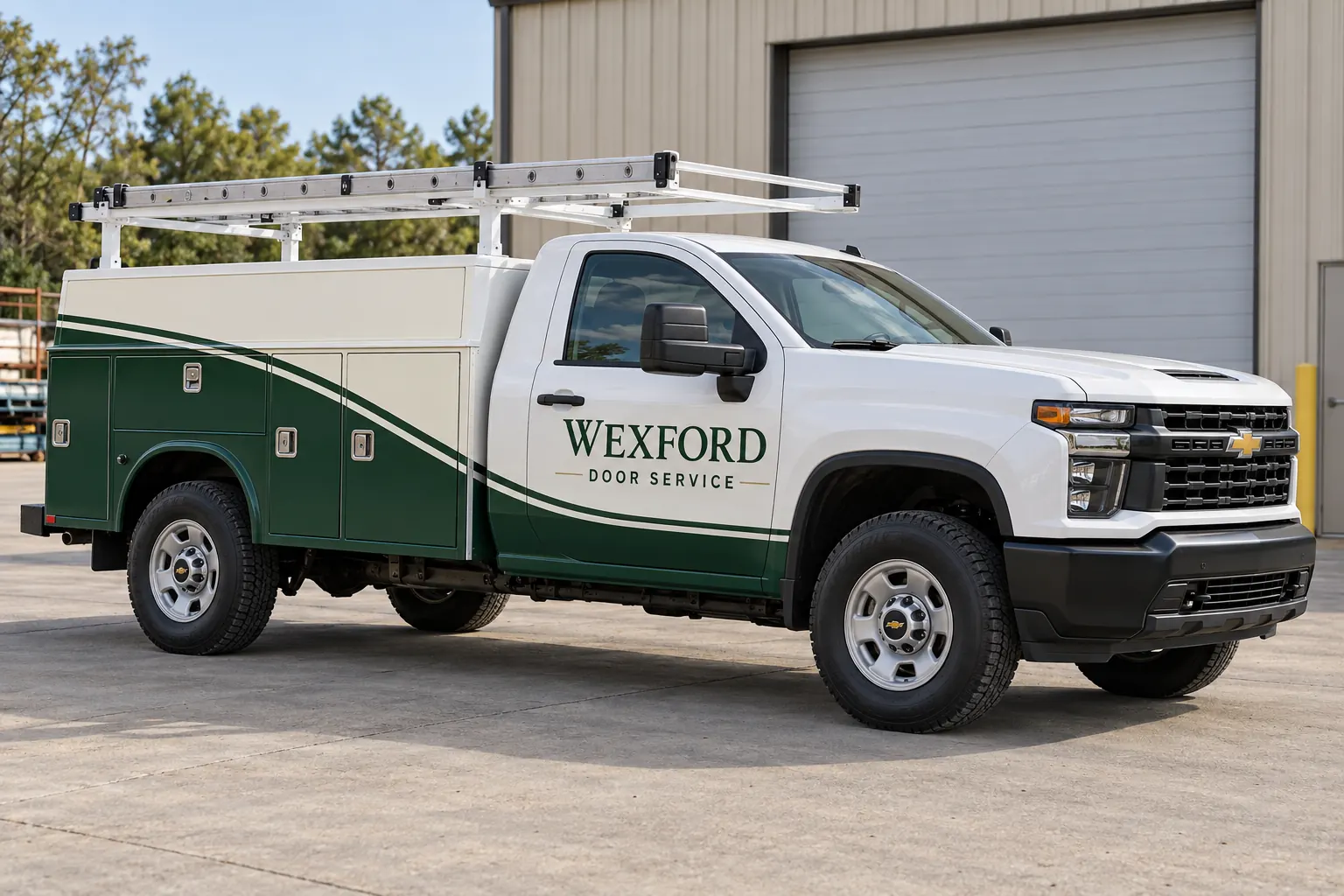
Original fictional commercial planning concept; not a completed customer installation.
Match the message to installation, repair or delivery
List the role of each vehicle before deciding which services to print. A repair van may need a concise service identity, while a delivery truck can represent a broader supply or installation operation. Decide whether residential and commercial work share one approved descriptor or need controlled variants. Avoid giving every vehicle a complete catalog simply because the company offers several services.
Confirm contact wording with the team that receives inquiries. A customer should reach the appropriate booking or sales route rather than a temporary crew contact. If the business advertises urgent service or a response window, have the responsible owner verify the exact claim. Keep promises out of the artwork until the operating arrangement supports them.
Show racks and carried loads in the survey
Photograph both sides and the rear with the normal racks, ladders and external accessories present. Explain whether the crew routinely carries long materials that obscure a side panel or a rear message. Supply additional clear views of the underlying body where the provider needs them. The survey should reveal both the usable surface and the practical obstruction.
Identify planned equipment changes early. A rack ordered for a new truck can alter what is visible after graphics are installed. Mark uncertain arrangements as unresolved rather than using a temporary photograph as a final reference. Ask the supplier to review the intended configuration before a layout is treated as ready for the actual vehicle.
Design around service body compartments
A utility body divides the side into doors, latches, hinges and different panel sizes. Provide close photographs of those features and the body manufacturer information if available. The company name may need a different arrangement from a van with a broad uninterrupted side. Review whether essential wording crosses a compartment boundary or becomes incomplete when a door is open.
The fictional Wexford Door Service pickup illustrates a shared identity across the cab and an enclosed utility body. Its concept image does not establish measurements or installation methods. Use it to discuss a visual direction, then rely on the actual truck survey and project-specific review to define placement around your equipment and hardware.
Choose a clear hierarchy for the services customers request
Give the company identity the space it needs, followed by a short approved service category and the intended contact route. If the audience includes both homeowners and facility managers, select wording that accurately reflects the business without making the side panel read like a service agreement. Detailed product ranges belong in the sales conversation and supporting material.
Review the rear message separately. A rack, open cargo area, hitch or rear-door arrangement can make the available space very different from the side. Keep the important information together on an appropriate area of the real body. Avoid assuming that a large side design can simply be reduced and placed over every rear configuration.
Keep product brands and dealer claims controlled
If the business wants a door manufacturer logo or dealer descriptor, provide the approved assets and the current conditions governing their use. Ask the person who manages the relationship to approve the proposed presentation. Do not add familiar product marks merely to make the vehicle appear more established. The business identity should remain accurate and defensible.
Record the approved version with the proof. If a product relationship changes, identify the affected units and decide what needs updating. A later reorder should not reproduce an outdated dealer claim because it remained in a convenient archive folder. Keep inactive marks separate from the artwork that is approved for new vehicles.
Compare coverage across the actual fleet bodies
Request defined options for the vehicle types you own. Door lettering, coordinated partial graphics and broader coverage should be compared against a stated unit list and included areas. Identify whether the quote covers a cab, the service body, the rear or a separate delivery box. Ask how body-specific artwork adaptation and existing graphic removal are handled.
If a truck and trailer normally travel together, supply both as separate assets and describe the intended visual relationship. Do not assume one quote includes both. Confirm ownership and current surface information for each asset. A coordinated identity can still require different layout and installation decisions for the truck, utility compartments and trailer panels.
Arrange work without losing track of active jobs
Identify which crew or dispatcher controls vehicle release and which work can be moved to another unit. Describe the desired sequence and actual access constraints in the inquiry. Ask the provider to confirm the project arrangement after reviewing scope and condition. Keep an installation date connected to its real dependencies, including artwork approval and vehicle readiness.
When a new truck is awaiting a rack or body fit-out, explain the order of those changes. Avoid finalizing graphics against an incomplete configuration without discussing the uncertainty. Retain the agreed handoff contact and unit reference so a substitute vehicle does not arrive under the wrong proof or an older truck’s artwork version.
Build a repeatable request for the next vehicle
Keep a unit list linking each vehicle to its body configuration, approved service descriptor, contact line and artwork reference. Add current photographs when hardware or condition changes. This helps the next buyer distinguish a compact repair van from a utility pickup even when both carry the same logo and operate from the same branch.
For a Pelican Wraps inquiry, send photographs, quantities, body details, brand assets and the coverage you want reviewed. Flag carried-load obstructions and manufacturer mark approvals. Use the broader fleet and service-body resources for general scope questions, then make the garage door operating details explicit so the first discussion can lead to a useful, comparable proposal.
Frequently Asked Questions
Take the Next Step with a Clear Project Brief
Continue with the resource that matches your next decision:
- Service Body Truck Wraps
- Van Wraps
- Fleet Wraps
- Trailer Wraps
- Fleet Wrap Design Standards
- Request a Quote
- Industries
Send the actual vehicle or surface photographs, quantities, approved brand files, requested coverage and timing constraints. Identify open questions so the project review can address your equipment and business needs.
