
Industrial Testing Fleet Graphics
Industrial testing fleet graphics need a clear distinction between business identification and technical authority. Your pickup, van or equipment carrier can show who the team works for without implying an accreditation, site permission or test result. Build the brief around actual vehicle roles, client-site operating conditions and approved public wording. Then connect the selected identity to the real body, equipment and approval process.
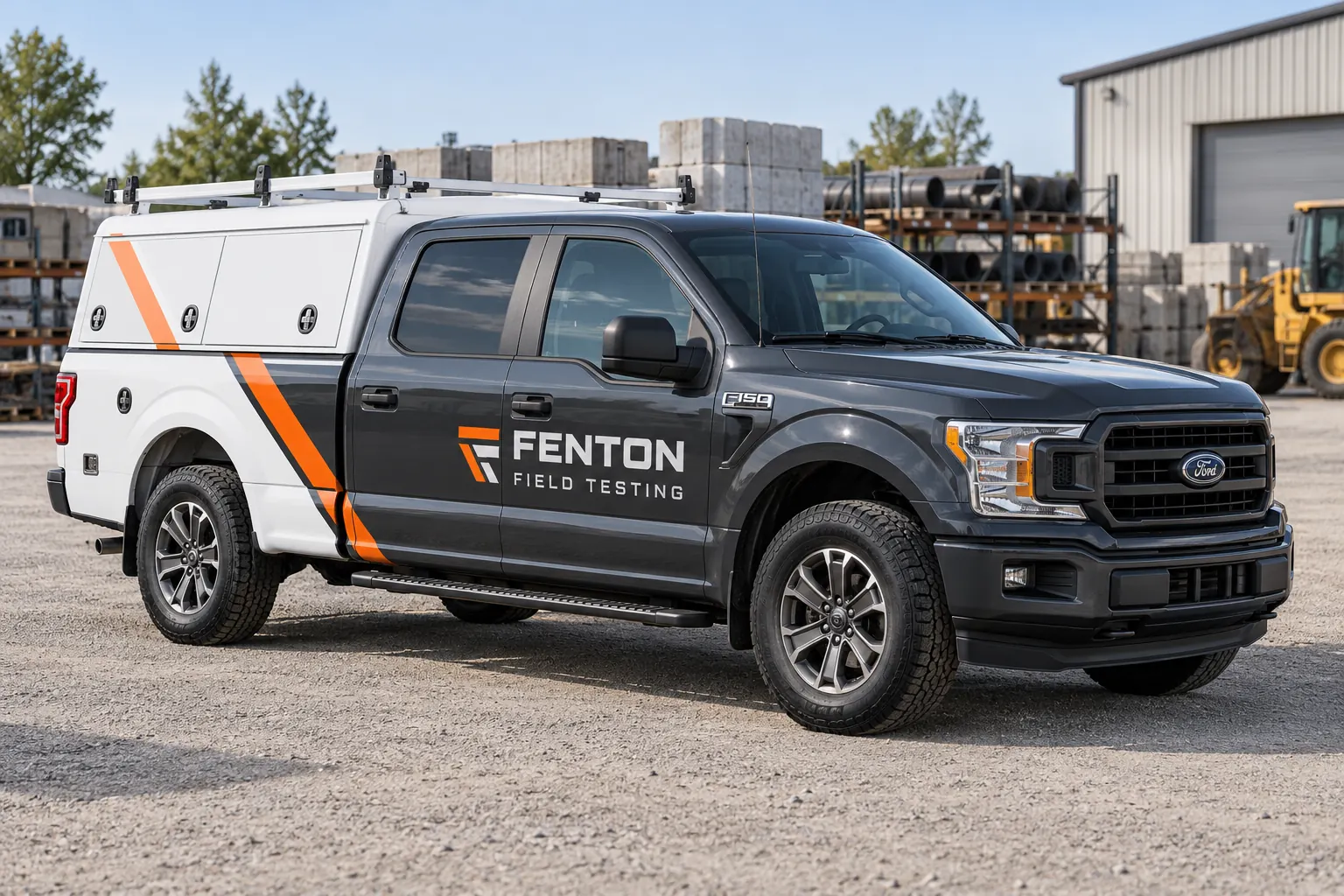
Original fictional commercial planning concept; not a completed customer installation.
Group the fleet by the work each unit supports
List the vehicles used for field visits, equipment transport, supervisory work and other actual functions. Identify any separate trailers or mobile equipment assets included in the request. Decide whether the entire fleet uses one accurate descriptor or whether a controlled service variation is needed. Avoid writing a complete technical capability catalog across every panel.
For each group, record the quantity, body configuration and public contact route. A field pickup and an enclosed equipment van may share a name but need different layouts. This first inventory helps the buyer request a coherent program without assuming that all vehicles have the same usable surfaces or that every service listed by the company applies to every team.
Control accreditation and technical service claims
Have the responsible business contact approve the exact service wording. If a technical designation, accreditation mark or client logo is proposed, provide its current permitted asset and use conditions. Keep verification with the person who controls that claim. Do not treat an old presentation slide or a badge visible on another company’s truck as a usable source.
Distinguish business identity from statements about a particular test or report. Vehicle graphics should not imply that an illustration demonstrates performance or proves a result. If the business cannot verify a proposed claim in the intended context, leave it out until the question is resolved. The supplier can place approved content; the graphics process does not establish technical competence.
Describe site identification needs without publishing access data
Ask operations what the vehicle needs to display for ordinary business recognition and what must remain in the client’s own access process. A public company name can be useful at an arrival point, while gate codes, client contacts and other access information do not belong in the graphics brief. Keep site authorization and visitor procedures separate from the branding decision.
If a client requires a specific project identifier, have the business review its use and duration. Decide whether it belongs on the vehicle at all and who controls its removal or update. Do not let a temporary site assignment become a permanent master design that is reproduced after the job or permission has ended.
Survey canopies, compartments and equipment trailers
Provide current photographs showing the cab, canopy or service body, rear and relevant hardware. Identify racks, external storage, hinges and equipment that may obscure the proposed message. Include separate photographs for trailers or equipment assets requested in the scope. Explain planned changes so the layout is not finalized against a temporary configuration.
The fictional Fenton Field Testing pickup demonstrates a simple orange and white identity on a dark cab with an enclosed canopy. It is a planning concept, not evidence of an accredited business or a surveyed installation. Use the visual direction to discuss hierarchy, then base the actual placement and surface assessment on your equipment and approved project information.
Keep public branding distinct from asset control
Decide which information is for customers and which is for internal fleet management. A company contact route, a unit identifier and a temporary project number have different owners and update cycles. Record those distinctions before the proof becomes crowded with unrelated numbers. Ask the fleet contact to identify any existing information that must remain visible and unchanged.
Use a stable unit reference in the project file so the supplier can connect photographs and proofs to the right asset. Avoid putting sensitive equipment inventory or client details into public artwork merely because the information is available. A controlled identity can remain consistent while operational records carry the detailed information needed by dispatch and project teams.
Compare coverage against real use and future changes
Request specific coverage options for each body group. Identify whether the scope includes the cab, canopy, rear, separate trailer and any existing graphic removal. Ask how artwork adaptation, condition assessment and installation arrangements are handled. Compare those descriptions with the totals rather than treating a large concept image as a complete specification.
Discuss likely changes such as canopy replacement, branch reassignment or a revised service descriptor. The buyer can choose a clear current scope while retaining a practical version record for later work. Do not assume that a planned future change has already been priced or that a saved proof will automatically fit the replacement equipment.
Coordinate release with field commitments
Identify the operational contact who controls vehicle availability and the real constraints on releasing each unit. Explain whether equipment can be transferred or whether a particular vehicle is needed for booked work. Ask the graphics provider to assess the project arrangement before a date is treated as confirmed. Keep artwork approval, equipment readiness and dispatch release visible as separate dependencies.
If several branches are involved, nominate one person to keep the unit list and approved versions current. Confirm the actual asset at handoff. A similar pickup with a different canopy should not be substituted under the original proof without review. Retain any changed scope or sequence in the project record so purchasing and operations see the same arrangement.
Build a quote package with a clean approval route
Send the vehicle and equipment list, exterior photographs, approved brand assets, verified service wording and requested coverage. Identify any marks needing permission and the business contact responsible for them. Include known surface concerns, existing graphics and release constraints. Label temporary project information and unresolved decisions clearly rather than leaving the supplier to infer what is permanent.
Use the broader fleet and service-body pages for overall program decisions. A Pelican Wraps inquiry can then address industrial testing equipment, public identification and approval details within a defined scope. Keep technical reports and sensitive client records outside the graphics package unless a specific, authorized need has been established through the normal business process.
Frequently Asked Questions
Take the Next Step with a Clear Project Brief
Continue with the resource that matches your next decision:
- Fleet Wraps
- Service Body Truck Wraps
- Commercial Vehicle Photo & Measurement Guide
- Fleet Wrap Design Standards
- Request a Quote
- Industries
Send the actual vehicle or surface photographs, quantities, approved brand files, requested coverage and timing constraints. Identify open questions so the project review can address your equipment and business needs.
