
Concrete and Paving Contractor Fleet Graphics
Concrete and paving fleets often combine heavy trucks, pickups and service vehicles. Create a clear contractor identity across those bodies, with readable wording, verified identifiers and a practical record for units that have different equipment, surface conditions and availability.
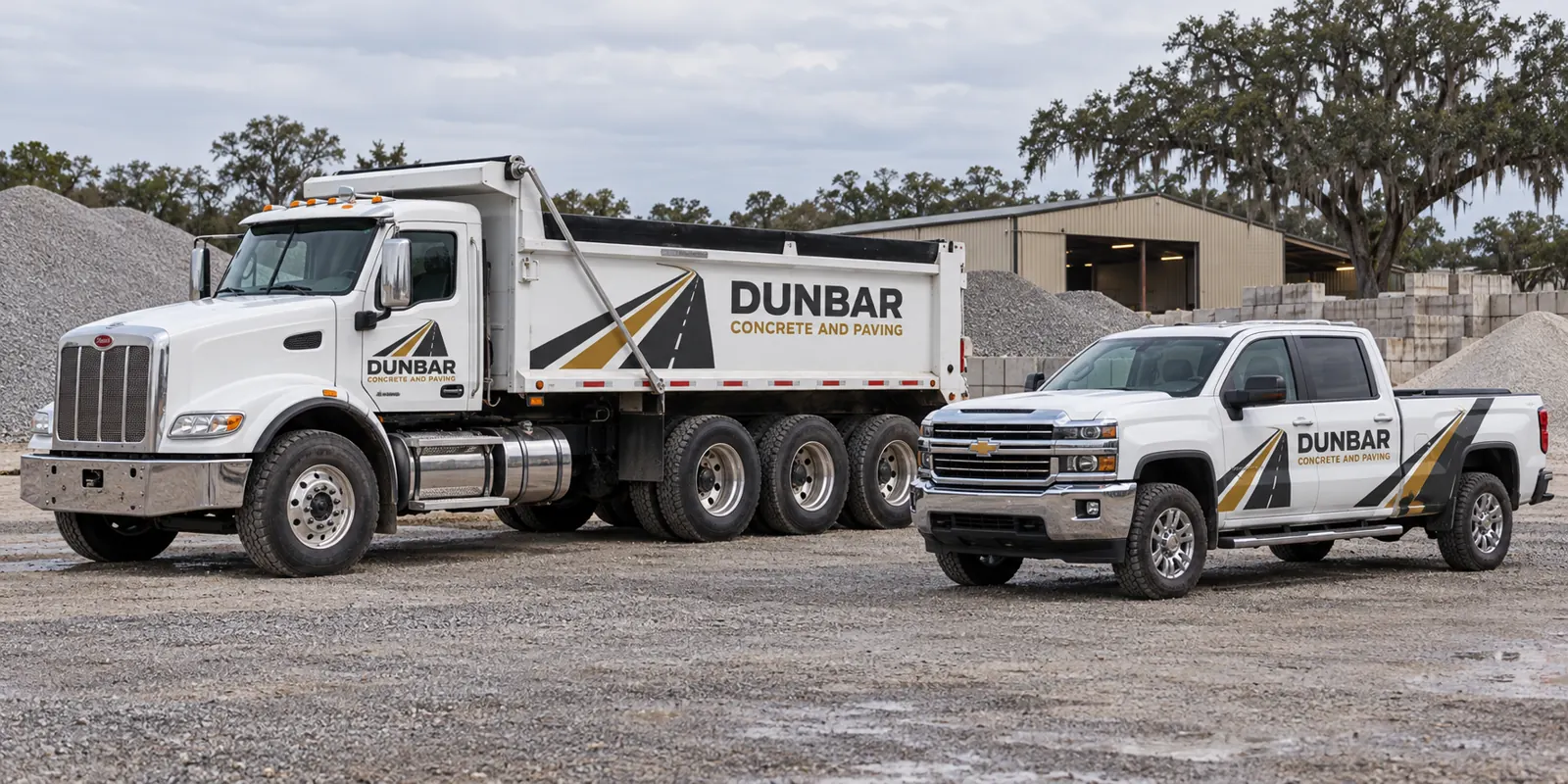
Fictional commercial wrap design concept; not a completed customer installation.
Make the contractor and its work clear
Start with the business name and a concise description of the concrete or paving work offered. A heavy truck may be visible alongside several other contractors at a site. The operator identity should remain recognizable without requiring a viewer to study a complicated road image or a long list of capabilities.
Choose a primary contact route and give it a clear role. Commercial enquiries, dispatch and other operational contacts may serve different purposes. Have the business confirm what belongs on the vehicle. Use approved accurate wording rather than adding performance promises, qualifications or affiliations solely to strengthen a visual concept.
Organize heavy vehicles and support units separately
List each chassis and body configuration with quantity and current photographs. Dump bodies, service bodies, pickups and other equipment can offer very different graphic areas. A cab model alone does not describe the structure behind it. Separate unusual units from standard versions so the proposal does not assume a uniform fleet.
Use the dump-truck page, service-body route and pickup page for equipment-specific planning. Photograph vehicles in their normal parked configuration with equipment safely stowed, including the actual hardware and stable panels available.
For example, keep a dump-body version separate from a service pickup even when both display the same contractor name. Note the stable graphic panels and the information each unit needs. That distinction lets reviewers assess a practical cab layout for one vehicle and a larger body treatment for another without confusing the shared brand with identical coverage.
Review structural divisions and functional information
Body ribs, rails, compartments, access areas and equipment can divide the composition. Review the contractor name against current photographs before approving a continuous graphic treatment. Selected suitable panels may communicate more clearly than forcing the message across every interruption. The body should guide the layout rather than be hidden by a simplified outline.
Identify warnings, equipment labels, verified identifiers and access areas that must remain visible and usable. Have the responsible owner review those exclusions. The written scope should state the included surfaces clearly, without treating decorative branding as a replacement for operational information or as an equipment modification.
Choose coverage around practical identification
Lettering can establish a direct operator identity on the cab and suitable body panels. Partial graphics can connect those areas with a recognizable color system. Fuller coverage offers another direction where the surfaces and message support it. Compare defined treatments using the same wording and actual vehicle photos.
The lettering guide and partial-wrap guide help define the requested work. More printed area does not automatically make the contractor easier to recognize. Ask which panels and preparation are included rather than relying on a package name as the scope.
Keep business details and artwork versions accurate
Provide the approved logo sources, colors, essential wording and verified unit list. Supply any business or vehicle identification from your own current records and confirm relevant requirements through the appropriate authority where needed. Choose one coordinator to consolidate feedback and identify the reviewers responsible for equipment or specifications.
Review side and rear views separately, then retain the dated approved proof with the body configuration and identifier. The graphics management route connects later additions, repairs and contact changes with a maintained reference. A replacement truck may share the same role while needing a different layout.
Plan condition review and release windows around site work
Disclose old vinyl, residue, corrosion, repairs and damaged finishes with close photos. Graphics should not be treated as a repair for an underlying surface concern. Removal, preparation and suitability need review before approval. An earlier fleet identity does not establish the present condition of another vehicle.
Identify priority units, release windows and how many vehicles can be unavailable at one time. Clarify access, transport and collection against the confirmed project arrangement. The inventory worksheet can connect units, photo references, condition questions and availability so the operating plan does not depend on an assumed generic duration.
Prepare a concrete or paving fleet brief
Send the equipment list, quantities, current photos, brand sources and essential message. Identify coverage preferences, specifications, existing information to preserve and timing. Make unknown body details visible rather than assuming a familiar truck category resolves them. Keep the approval owner clear before artwork moves toward production.
Use the commercial cost guide and request a concrete or paving fleet quote. The heavy truck and pickup shown here use a fictional contractor identity. They illustrate a coordinated design direction without presenting customer installations, operating qualifications, construction results or business performance as evidence.
Frequently Asked Questions
Turn Your Vehicle Details Into a Clear Project Brief
Send current photographs, vehicle quantities, logo files, coverage preferences and timing. Identify old graphics and paint concerns so the project review can address the actual equipment.
Explore planning resources or request your commercial wrap quote.
