
Vehicle Wrap Artwork Guidelines for Clear Commercial Graphics
Good wrap artwork works with the vehicle rather than treating it like a flat poster. This guide helps business owners and designers prepare a readable message, useful source files and a complete approval package before commercial graphics move into production.
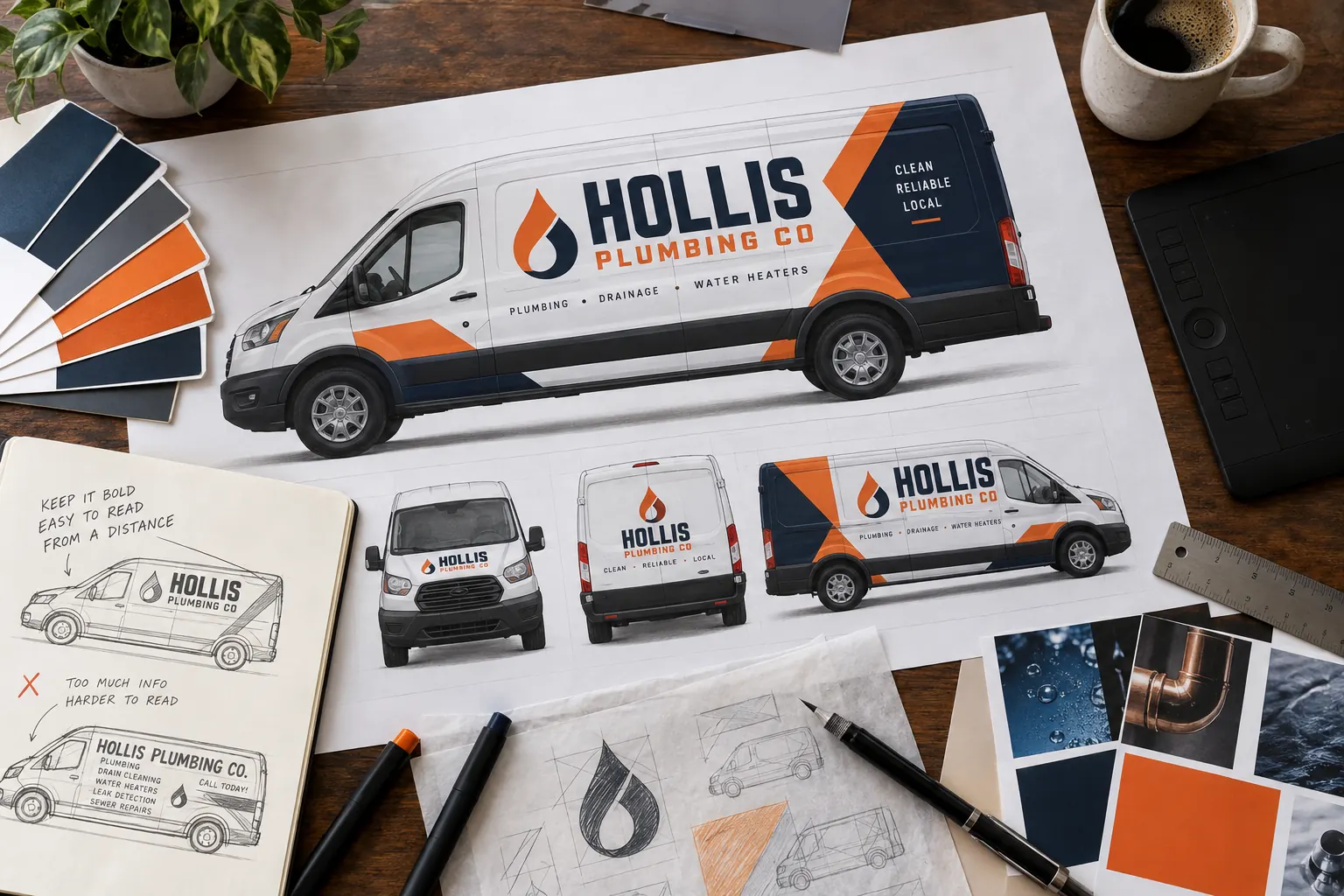
AI-generated illustrative planning or care scene; fictional branding where shown, not documentary customer or shop photography.
Start with the message a person can recognize quickly
Choose a clear hierarchy before opening a design file. Most commercial vehicles need the business name, a short description of the work and a primary contact route. Those elements compete for limited attention. Long service menus, multiple phone numbers and small social icons can make an unfamiliar brand harder to understand, even when they fill empty space.
Write the essential message as plain text and identify the order of importance. Explain whether the vehicle will primarily work at customer properties, deliver goods, travel between jobs or attend events. Those situations help guide the layout. For an initial coverage decision, compare full wraps, partial wraps and lettering before commissioning unnecessary detail.
Collect source files and explain what you actually have
Send the original logo artwork if it is available, along with brand colors, fonts and existing brand guidelines. Identify who owns or has permission to use supplied photographs, artwork and typefaces. A small image copied from a website may help explain the appearance, but it may not contain enough detail for large vehicle graphics.
Vector logo files can be useful because their shapes can scale, but the extension alone does not guarantee usable artwork. A file can contain a low-resolution image even when saved inside a vector document. Provide the best source rather than simply renaming a file. If you only have a screenshot, say so early so reconstruction or alternative artwork can be scoped before approval.
Match the exact vehicle and document obstructions
Supply the year, make, model, wheelbase and roof height, plus straight-on photographs from each side. Include any aftermarket box, service body or trailer dimensions that identify the configuration. Templates can support planning, but current photographs reveal ladders, racks, replacement panels and equipment that a generic outline may omit.
Mark handles, hinges, recesses, fuel doors, sensors and windows that could interrupt essential wording. Consider the rear view separately from the side view: split doors and a center gap can divide a phone number or business name. Share the way the vehicle is normally used, including open doors or attached equipment, so the proof can be assessed against daily operation.
Build a commercial layout with real viewing conditions in mind
Give the primary message enough contrast and separation to remain recognizable in a busy setting. Judge the composition at a reduced size as well as close up. A proof that looks impressive on a large monitor may rely on details that disappear when the vehicle is across a parking area. Use the side and rear views to test what survives that reduction.
Do not place every important element near a seam or panel edge. Preserve breathing room around text, and let the approved coverage shape support the design. For mixed fleets, define consistent colors and hierarchy while allowing the layout to change with each body. A box truck and a utility pickup can look related without forcing the same arrangement onto both.
Review color, imagery and content before production approval
Screen displays and printed materials can show color differently. Identify brand-critical colors early and ask how they will be reviewed for the proposed print system. Do not assume that a screenshot or an uncalibrated display serves as a physical color standard. If a sample or other review step is agreed, record the approval clearly.
Check image quality at the intended output size, not just as a thumbnail. Verify names, spelling, contact details and domains against your current business records. Confirm that any license or other required identification supplied by your business is correct and suitable for its intended use. The design proof should not become a place where unverified claims are invented to fill space.
Use a proof checklist that a decision maker can sign off
Assign one person to gather feedback and provide a consolidated response. Review each vehicle view, the coverage boundary, the visible paint color and the treatment of hardware. Ask what the proof represents and which details still depend on vehicle inspection. Mark changes against a dated version so an earlier file does not accidentally become the approved reference.
Before approving production, read contact information character by character. Check that the artwork version, vehicle version and quantity agree with the written scope. Late changes can affect production and scheduling, so resolve uncertainty at the proof stage. The project process guide explains how artwork review connects to delivery and handover.
Create an artwork record for future fleet additions
Keep the final approved proof, the vehicle specification, the brand source files and the project reference together. Record which person can authorize changes. A new vehicle bought next year may have a different wheelbase or body even when the model name is familiar. Send its details instead of assuming an old production file will fit.
For a new project, submit your vehicle photographs and artwork with a short explanation of what is ready and what needs design work. If budget is still being developed, use the cost guide to separate artwork, coverage and preparation. A complete source package gives the project a clear starting point and makes approvals easier to manage.
Send Original Artwork and Its Supporting Files
Provide the editable source you have and a visual reference of the intended brand. The file extension is a starting clue, not proof of usable contents. Do not convert a small screenshot into another format and assume the underlying detail has improved. Explain what is original, what was exported and which files are your best available sources.
| What you have | What to include for review |
|---|---|
| Original logo artwork | Send the original AI, EPS, PDF or SVG files available, plus a reference image. The contents still need review. |
| Photographs or raster images | Provide the best original image and its intended use. Ask for quality to be assessed at the proposed output size. |
| Linked artwork assets | Include the supporting image files the document relies on, rather than sending only the layout file. |
| Typography | Identify the typefaces and provide permitted sources or an appropriate outlined version for review. Retain an editable master where available. |
| Brand colors | Supply the actual brand references and explain which colors are critical. A phone screenshot is not a physical print standard. |
For Illustrator projects, Adobe describes a packaging workflow that gathers the document, needed font files, linked graphics and a report. Review the official Adobe packaging guidance and observe the permissions relevant to the assets. A collected folder helps keep supporting files together; it does not approve the design or establish that every file is ready for vehicle-scale production.
Keep one clearly named source package, record its version and identify who can answer questions. This practical handover preserves the useful file-type guidance in one place instead of sending the buyer between overlapping artwork articles.
Use the Interactive Worksheet
Open the artwork preflight checklist. Track the source files, vehicle references and approval responsibilities your team has organized. This self-check does not inspect files or approve them for production.
Frequently Asked Questions
Turn Your Vehicle Details Into a Clear Project Brief
Send current photographs, vehicle quantities, logo files, coverage preferences and timing. Identify old graphics and paint concerns so the project review can address the actual equipment.
Explore planning resources or request your commercial wrap quote.
Explore Related Project Guides
- Fleet Graphics Font Licensing Handoff
- Fleet Graphics Multilingual Copy Approval
- Fleet Graphics Phone Number Change Plan
- Fleet Graphics Photo Asset Licensing Checklist
- Fleet Graphics Print Panel Identification Plan
- Fleet Graphics Proof Version Control
- Fleet Graphics Spot Color Approval Record
- Fleet Logo File Ownership Checklist
- Vehicle Graphics QR Code Proof Test
- Vehicle Graphics Website Address Selection
