
Rental Equipment Unit Number Decals
Rental equipment unit number decals help people connect a physical asset with the business record used to identify it. A useful request starts with the current rental inventory, the actual unit and the exact identifier. This guide builds a unit-to-decal record for additions or replacements. It keeps a rental company's identifier separate from manufacturer identification and other existing information, and gives a graphics provider a defined set of instances to assess.
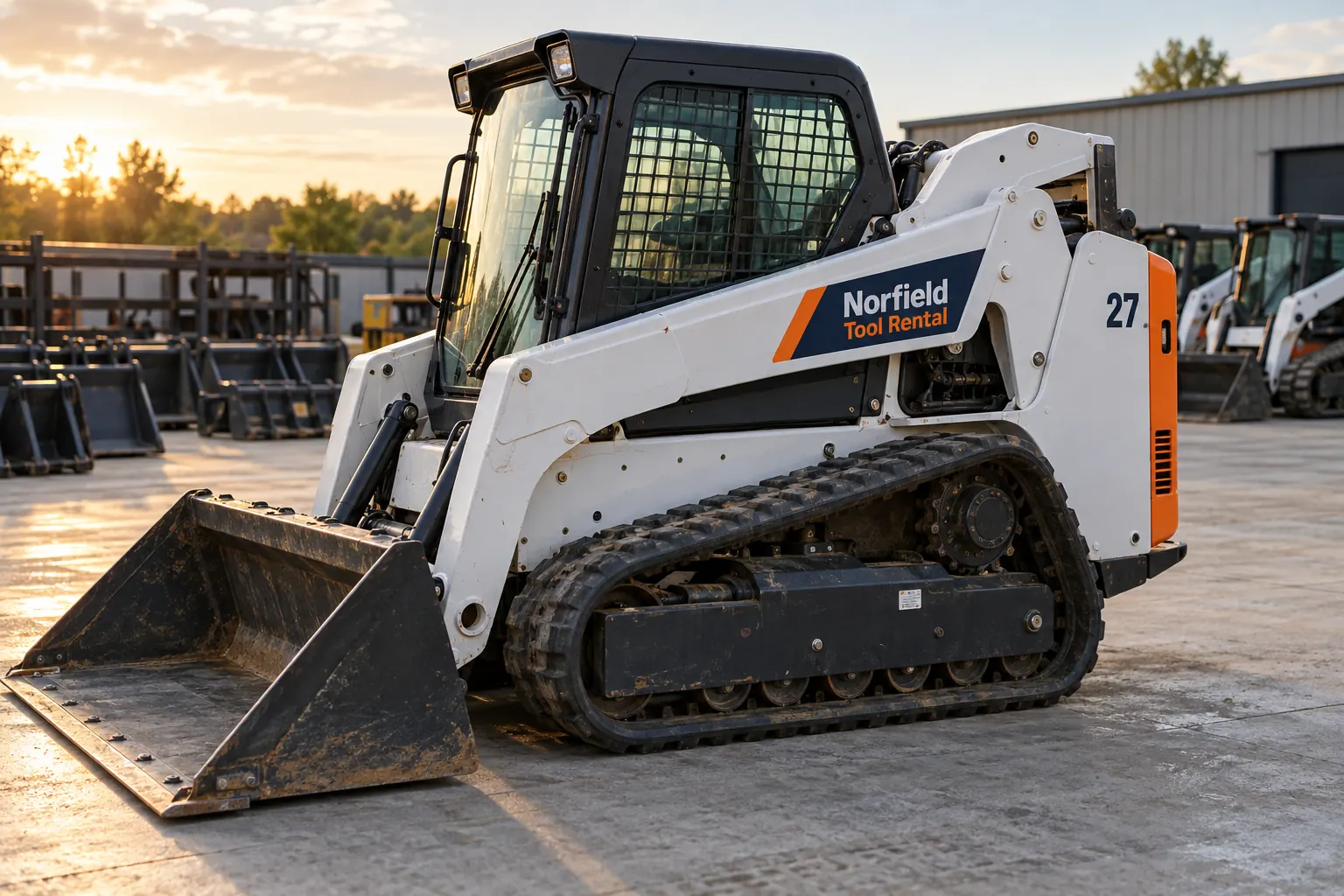
Original fictional commercial planning concept; not a completed customer installation.
Start with the rental inventory source
Ask the rental inventory custodian which record governs the identifier for the requested equipment. Copy the exact value and retain the source reference. Record the equipment description and any context needed to distinguish it from a similar asset. Do not create a fresh numbering sequence in the graphics brief simply because the existing fleet appears inconsistent.
For example, a rental list might identify one actual machine as unit 27 while an older photograph shows a different number. The useful action is to flag that discrepancy for the custodian. The graphics request should name the confirmed current value and show who resolved the conflict. A neat list assembled from visible decals can otherwise reproduce a former assignment that the inventory system no longer treats as current.
Map identifiers to physical units before counting decals
Create one row for each actual asset. Include the rental identifier, the business’s equipment description, a current overall photograph reference and the person confirming the match. Use existing authorized records to distinguish similar machines. Keep unknown assignments open rather than using a generic product photograph as proof that the requested unit has been identified.
Then list the requested decal instances for that unit. Two side identifiers on one asset are different from one identifier on each of two assets. State the actual proposed areas and link their photographs to the same row. This makes quantity meaningful and lets the provider ask about a missing side view without losing the connection to the correct equipment record.
Preserve the exact identifier as business data
Check characters, spacing and punctuation against the selected source. A letter O and a number zero can look similar in a photograph. Ask the custodian to settle ambiguous values in text. Keep the approved value available to the proof reviewer instead of relying on a verbal description of what the current decal seems to say.
Do not add leading zeros as a visual convention or remove characters from an actual identifier to make a layout cleaner. The business source governs the identifier. Appearance choices such as type treatment and supporting identity can be reviewed separately. If the business wants to rename or renumber equipment, identify that broader change and its owner before assuming a replacement decal is authorization to alter the inventory.
Collect actual area views and preservation instructions
Provide current views of each proposed graphic area and useful surrounding context. Identify existing manufacturer plates, technical labels, hardware and other information through the equipment owner’s supplied sources. Ask the relevant equipment contact and graphics provider what further information or assessment is needed for the actual surface and proposed treatment.
Keep the rental unit number distinct from original equipment identification. A buyer’s asset identifier should not be treated as a replacement for a manufacturer plate or another original label. Record any area exclusions or instructions supplied by the responsible owner, with their source. Do not infer a universal placement, product or clearance from a photograph of another machine that happens to use the same rental company’s colors.
Make the requested set easy to reconcile
Give each requested instance a reference such as unit 27, left side proposed area, and connect it to the relevant current photograph. State whether it is a new addition, replacement of a known graphic or another defined task. Identify old artwork references as history until the business confirms that they remain suitable for the current identifier and equipment.
Record the total after the instances are mapped. If the request includes several equipment types, group them for discussion without assuming their surfaces or usable areas are identical. Ask the proposal to identify the actual treatment and work included. A single price or quantity cannot resolve an unclear mapping between unit numbers, equipment types and the areas the buyer expects to receive graphics.
Review the proof against the identifier register
Compare each proof value with the controlled rental source. Check that its unit and area references match the request. Review the proposed appearance with the provider using the actual equipment views and supplied instructions. Consolidate comments into one current version rather than allowing separate depot contacts to send conflicting character corrections.
Record unresolved questions with owners. If a unit assignment changes before production, identify the affected instances and return the updated source to the provider through the project process. Keep the earlier proof as history. The approval record should make clear which exact identifiers and quantities were reviewed, and should not imply that an earlier visual concept remains current after the inventory information changes.
Keep a replacement-ready unit number record
The local worksheet collects the governing source, unit mapping, proposed instances, area evidence, proof decisions and update owner. Retain the actual asset photographs and approved artwork references through your normal business process. After work, add the relevant project reference and current evidence rather than treating the inquiry worksheet as proof of what was installed.
For Pelican Wraps, send the confirmed unit list, actual equipment views, requested instances, supplied preservation instructions and coordinating contact. Identify missing evidence and requested timing. Use equipment graphics for the broader service discussion and the replacement photo record when an existing decal needs documenting. A useful handoff lets the next buyer order against the correct actual unit without reconstructing its identity from a worn label.
Draft and Download Your Working Record
Draft your entry, then download a copy before leaving. Send any project decision through the communication process agreed with your supplier.
Frequently Asked Questions
Take the Next Step with a Clear Project Brief
Continue with the resource that matches your next decision:
- Equipment & Machinery Graphics
- Equipment Decal Replacement Photo Record
- Equipment Brand Plate Preservation Guide
- Request a Quote
Send the actual vehicle or surface photographs, quantities, approved brand files, requested coverage and timing constraints. Identify open questions so the project review can address your equipment and business needs.
