
Construction Fleet Wraps for Work Trucks and Equipment Trailers
A construction fleet needs to look organized while working around tools, changing job sites and different vehicle bodies. Build a clear identity across crew trucks, service bodies, vans and enclosed trailers, with a message that remains understandable when the vehicle is parked at a customer's property.
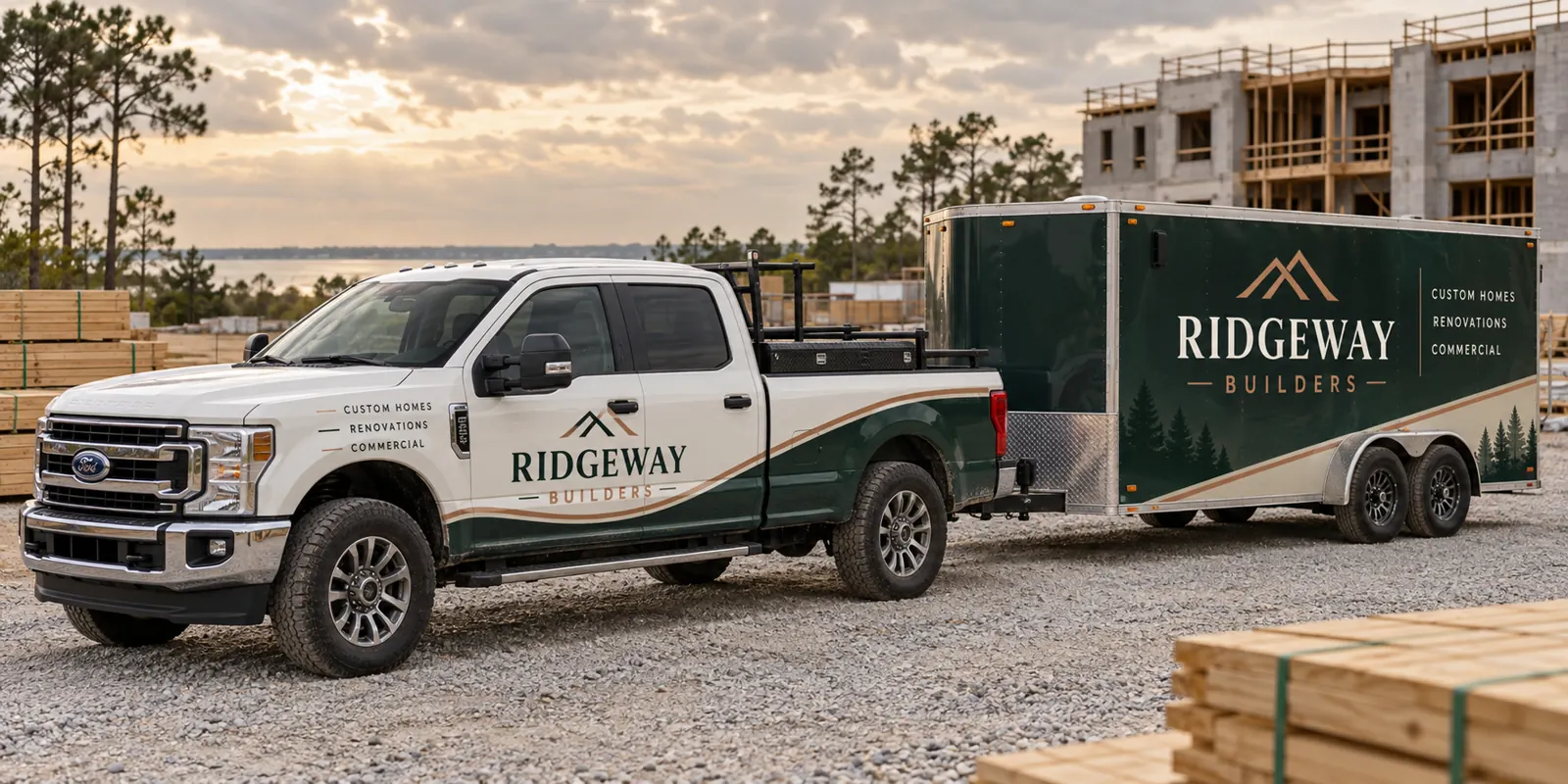
Fictional commercial wrap design concept; not a completed customer installation.
Make the company and trade clear at the job site
A person passing a work site may see the vehicle before seeing a business card or proposal. Start with the company name and the type of work you want to be recognized for. General construction, renovation, concrete work and specialist trades are different messages. Choose the description that helps a potential customer understand the business without reading a long list.
Add one practical contact route and give it space to remain readable. A fleet number or secondary detail should support the layout rather than compete with it. The goal is a professional, recognizable identity, not an invented claim that graphics alone generate a fixed number of leads. Use a dedicated enquiry route if you want to evaluate the response alongside your other marketing.
Plan around service bodies, racks and real work equipment
Construction vehicles often have ladders, toolboxes, fuel doors, utility compartments and replacement bodies. Those details change the usable graphic area. Photograph the vehicle in its normal working configuration, including racks and attached equipment. A clean drawing of a standard pickup will not show every obstruction on a working service truck.
Review essential text against compartment gaps and frequently handled doors. Keep the design readable when equipment is loaded and identify areas likely to receive wear from daily access. For the vehicle-specific planning route, see commercial truck wraps and provide the cab and body details together. Do not price a custom service body as though it were a plain bedside.
Connect the tow vehicle and trailer without copying a layout
An enclosed trailer can provide a large branded surface while the tow vehicle carries a more compact identity. Use shared colors, logo treatment and message hierarchy to connect them. The two do not need identical placement to look like the same company. Give each body a layout that works with its proportions.
Account for side doors, rear ramps, hinges, vents and latches before approving a trailer design. Decide what should remain visible when the trailer is parked at a job and when the tow vehicle is away. The trailer graphics page covers the equipment details to collect. Include trailer lengths and rear configurations when requesting a combined truck-and-trailer proposal.
Choose coverage that suits your brand and the existing paint
A simple lettering layout can work well on clean, consistent body colors. Partial coverage can create a stronger branded area while allowing the existing paint to contribute to the design. Fuller coverage may help connect vehicles with different original colors. Compare those options around the intended message and the actual surfaces rather than assuming the most coverage is always the best decision.
Disclose peeling paint, rust, dents, repairs and existing vinyl. Graphics should not be used to avoid addressing a surface problem. Removal and preparation need their own scope where relevant. Compare partial wraps with lettering and decals using the same vehicle photographs and required wording.
Keep the fleet consistent as vehicles and crews change
Record each vehicle type and the quantity of each configuration. A crew-cab pickup, a long cargo van and a utility truck may share a brand system while needing separate artwork versions. Keep the company identity consistent, then decide how unit numbers, divisions or specialist services are added without weakening the main message.
Assign one person to approve brand changes and retain the final proofs. When another crew vehicle is purchased, review its body details before reusing an existing file. Document phone number or domain changes centrally so new units do not display information that differs from the rest of the fleet. A small artwork record can prevent inconsistent replacements later.
Fit the rollout around construction operations
List vehicles that can be released individually and those needed for critical jobs. Identify who delivers and collects each unit, and discuss how tools or accessories affect access to the graphic areas. Provide a desired timing window, then make operational commitments only around a confirmed schedule for the agreed project.
For a larger refresh, establish a pilot design or first approved vehicle version before expanding across different bodies. Review what carries over and what needs adaptation. The fleet planning route connects vehicle quantities, design versions and phased scheduling. It should give the business an organized rollout rather than a collection of disconnected one-off designs.
Send a project brief that makes the quote specific
Include current photos, vehicle and trailer specifications, quantities, existing graphics, brand files and essential wording. Identify the coverage options you want considered and any condition concerns. If your business needs particular identification displayed, supply verified details from your own records and confirm the requirements that apply to your operation.
Use the cost guide to compare scope and request a construction fleet quote when the equipment list is ready. The example image on this page is a fictional design concept. It demonstrates a possible visual direction without presenting invented vehicles as completed customer work.
Frequently Asked Questions
Turn Your Vehicle Details Into a Clear Project Brief
Send current photographs, vehicle quantities, logo files, coverage preferences and timing. Identify old graphics and paint concerns so the project review can address the actual equipment.
Explore planning resources or request your commercial wrap quote.
