
Equipment Rental Fleet Graphics for Delivery and Support Vehicles
An equipment-rental business may use delivery trucks, box trucks, service vehicles and supervisor units under one identity. Build a recognizable fleet system that explains the business, adapts to the actual bodies and keeps vehicle and artwork references organized for later additions.
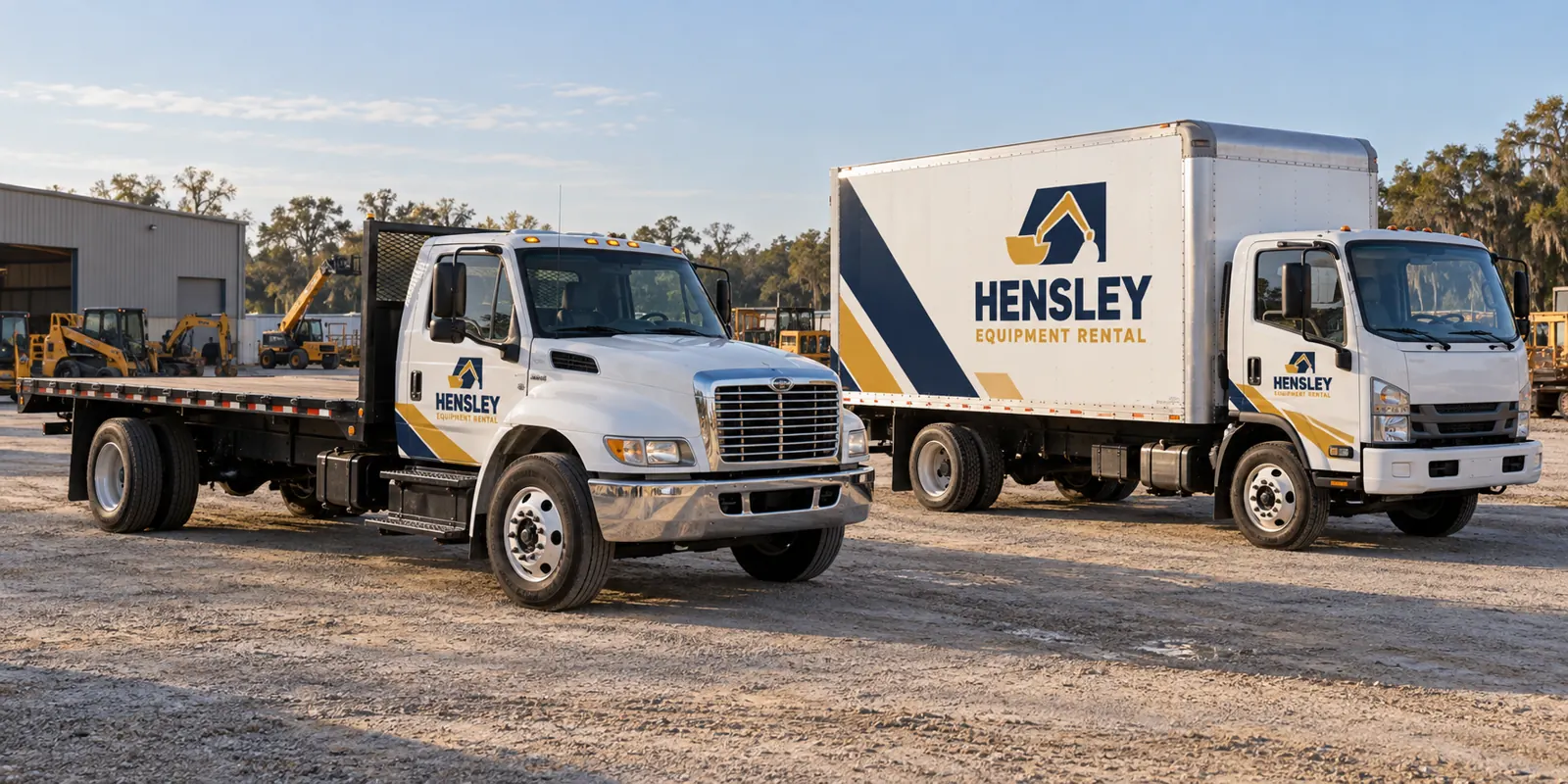
Fictional commercial wrap design concept; not a completed customer installation.
Define the rental-company identity and intended enquiry
Start with the business name and a concise description of the rental offering. A delivery vehicle may be seen by customers who have never visited the rental yard. The message should make the operator understandable without requiring a viewer to study a long catalog of machines. Give the identity and primary contact route enough space to be read.
Decide whether the vehicle should lead with the company, a particular rental division or another approved brand relationship. A website can carry the wider equipment list and availability information. The graphics should not introduce an unsupported inventory promise, qualification or operating claim simply because the large panel has room.
Organize delivery, service and supervisor vehicles separately
List truck and body configurations with quantities. A flatbed delivery truck, a box truck, a service-body unit and an SUV offer different graphic areas. Include current photographs of both sides and rear, plus the body or equipment details available. The chassis name alone may not identify an aftermarket delivery body.
Use the commercial truck overview, box truck page and service-body route for vehicle-specific planning. If rental assets are also requested for review, list them separately with their actual surfaces and existing equipment information rather than assuming they share the vehicle scope.
Adapt the message to large boxes and smaller cab surfaces
A box truck can carry a broader identity while a flatbed may rely more heavily on the cab and suitable stable panels. Preserve the hierarchy and color treatment, then adapt the placement. A long equipment list that fits a box side may become clutter on a compact support vehicle. Each unit should still be understandable on its own.
Review rear doors, loading equipment, compartments and access areas against current photographs. Important wording should not be divided by hardware. Identify existing warnings, equipment labels and identifiers that must remain visible and usable, with the responsible reviewer involved before the scope is approved.
Choose coverage for a repeatable commercial identity
Lettering can provide a direct business identity on selected panels. Partial graphics can introduce a recognizable color area and connect different vehicle bodies. Fuller coverage offers another option where the surfaces and message support it. Compare the treatments using the same essential wording and actual vehicle photographs.
The lettering guide and partial-wrap guide help define the requested boundary. Ask which surfaces are included and excluded rather than treating a package name as the scope. A larger printed area should support recognition instead of making the company harder to identify.
Keep unit references and approved artwork under one owner
Provide a verified identifier list and decide how those details relate to the main brand. Retain the approved proof for each body version and link it to the corresponding unit. A later replacement vehicle may share the same role while needing a different layout. Record body changes and accessories before requesting new graphics.
Choose a coordinator to verify spelling, phone numbers, domains and any approved partner assets. Consolidate feedback against a dated version. The graphics management route connects additions, repairs and brand updates with a maintained record rather than treating each request as an unrelated design.
Plan availability around deliveries and equipment support
Identify priority vehicles, release windows and the number that can be unavailable at once. Clarify transport, access and collection responsibilities before the operating plan depends on an installation date. Discuss a phased rollout against the confirmed project arrangement, allowing for different bodies and approved artwork versions.
Disclose old vinyl, residue, repairs, corrosion and damaged finishes with close photos. Graphics should not be treated as a repair for an underlying surface concern. Removal and preparation need to be explicit. The inventory worksheet can connect units, photos, condition questions and availability in a useful planning record.
Prepare a rental-fleet graphics brief
Send the equipment list, quantities, current photographs, logo sources and essential wording. State whether the project is a new identity, a refresh or additions to an existing fleet. Identify coverage preferences, approval ownership, existing information to preserve and timing. Make unknown measurements or body details visible instead of guessing them.
Use the cost guide to compare complete scopes, then request an equipment-rental fleet quote. The delivery trucks shown here use a fictional rental-company identity. They illustrate a possible coordinated direction without presenting customer installations, equipment availability, qualifications or business results as evidence.
Frequently Asked Questions
Turn Your Vehicle Details Into a Clear Project Brief
Send current photographs, vehicle quantities, logo files, coverage preferences and timing. Identify old graphics and paint concerns so the project review can address the actual equipment.
Explore planning resources or request your commercial wrap quote.
