
Fleet Graphics Completion Photo Review
A fleet graphics completion photo review connects current project photographs with the actual units, selected proof and work references. It helps a business identify missing views, exact-copy questions and visible scope discrepancies that need follow-up. This guide produces a photo evidence index and a bounded question log. It supports the wider installation handoff and buyer review; photographs alone do not establish every physical condition, technical outcome or commercial decision for the completed work.
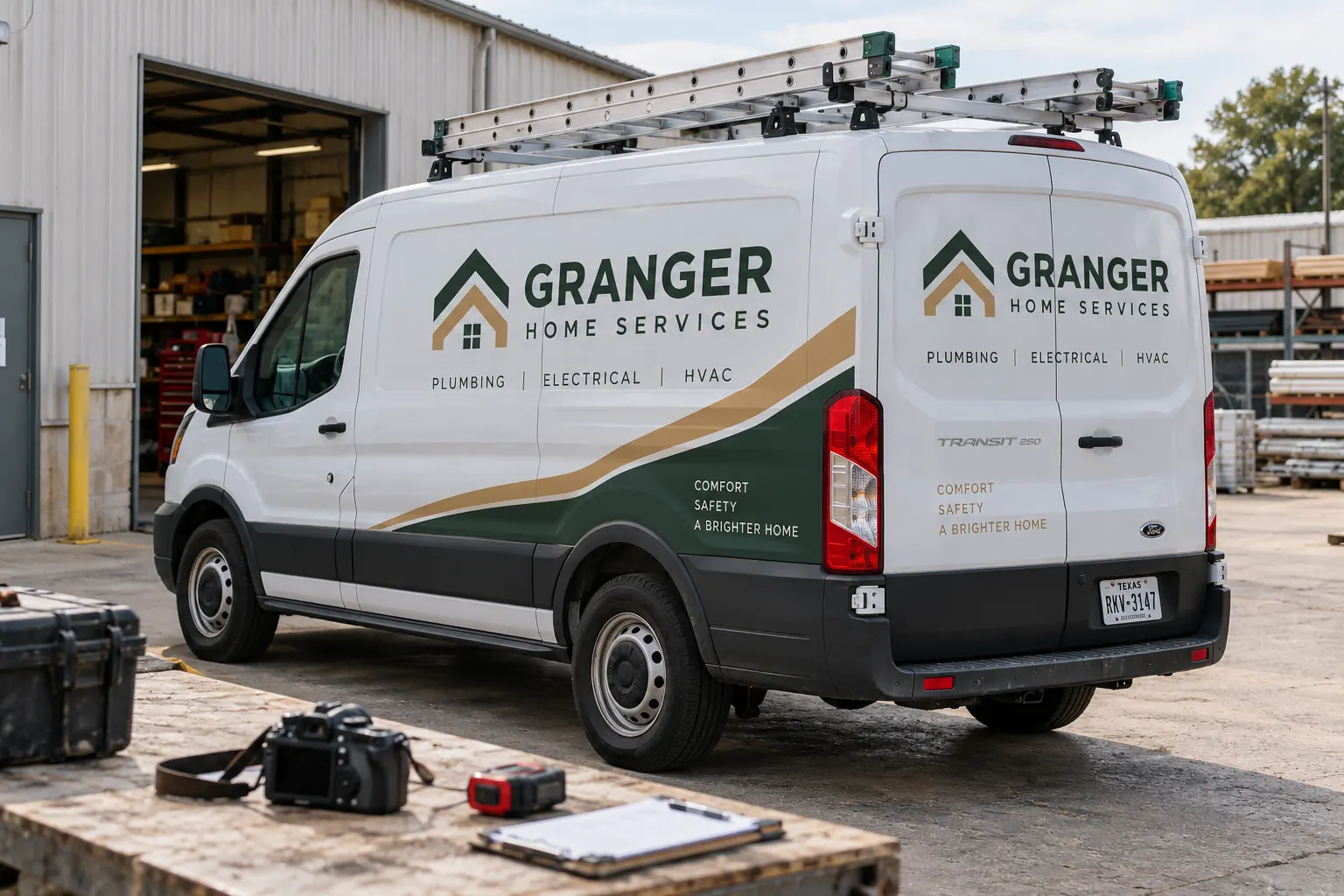
Original fictional commercial planning concept; not a completed customer installation.
Connect the photo set to the actual project units
Record the project and actual fleet unit identifiers before reviewing the images. Retain the supplied evidence date or source and identify who can confirm which unit each set concerns. Keep concept images, older installation views and actual current photographs distinguishable. Similar vehicles carrying the same identity can otherwise become mixed in a shared project folder.
An illustrative index could identify unit C27, current side view A and current rear view B, supplied through the normal project process. Those are example fields rather than proof of a real installation. Your evidence should use the actual source references. The first useful question is whether the photos concern the real unit and stage being reviewed, before anyone begins comparing a logo or contact line.
Index the views against the selected scope
Use the actual work and selected proof references to identify which areas the photo review needs to consider. Connect overall views and useful details to those areas. Record a missing view as a gap and ask the appropriate source for the actual evidence needed. A close image of one tidy panel should not silently stand in for the whole selected treatment.
Keep each requested view tied to a purpose. An overall view can establish context, while a closer view may help compare exact wording or locate a particular instance. Ask the provider for the relevant project evidence through the normal process. The review should stay focused on a defined question rather than demand a generic pile of photographs that nobody can reconcile with the actual scope.
Check exact public copy against the current source
Compare the visible company name, selected contact and other approved business copy with the actual source used for the project. Identify the proof version and unit or area concerned. When an image does not establish a character clearly, record the uncertainty and ask for the relevant evidence instead of guessing from a small or angled view.
Keep source changes distinguishable from a discrepancy with the selected work. If the business changed a public number after the approved project source, that creates a current change question with its own owner. The photo review should explain which source was compared and what was observed. This gives the provider a specific next action rather than an ambiguous report that the lettering looks wrong.
Map visible observations to a precise follow-up question
Write each observation with the actual unit, photo, selected proof or scope reference and question. An illustrative row can identify rear instance, photo B, selected proof r3 and a request to clarify a visible copy difference. Keep the observation and requested answer distinguishable from a diagnosis of cause or a proposed physical remedy.
Photographs can help locate a question while leaving information unavailable. Ask the relevant provider or source what further assessment is needed. Avoid turning image appearance into a universal conclusion about adhesion, surface preparation or future performance. A useful review records what can actually be seen and directs the bounded issue to the appropriate next stage without pretending the coordinator has performed a technical inspection.
Keep photo review separate from broader handoff decisions
Link the installation handoff and buyer acceptance record where the business uses them. Those sources can retain their actual scope, responses and decisions. The photo index should contribute evidence and specific questions while remaining distinguishable from a statement that every project item has been accepted or that every relevant document has been supplied.
If another record identifies an unresolved item, connect its reference rather than hide it because the overall vehicle looks complete in a photograph. Keep the actual work reference and remaining actions visible. A clean fleet image is valuable documentation, but the business still needs the evidence appropriate to the actual decision it is making. Use the responsible parties’ project process to address questions beyond the photo review.
Retain responses and current evidence by version
When the provider or other source responds, retain the actual answer and reference against the observation. If new photographs are supplied, connect them to the same unit and question. Preserve the earlier evidence as history. A new file should not silently erase the reason a follow-up was raised or leave the business unable to explain which current image supports the recorded status.
Record resolved and pending items separately with their owners. If a later change or replacement request arises, identify it as that new stage rather than keep editing an old completion observation into a different project. The resulting record helps the next coordinator find the selected proof, actual evidence and source response without relying on a colleague’s memory of a message thread.
Use the evidence index for a clear service conversation
The local worksheet captures actual units and source dates, scope-to-view mapping, current copy references, observations, source responses and remaining actions. Retain actual files through the normal business process. The Granger Home Services image is a fictional completion-photography concept, not evidence that Pelican Wraps completed that customer’s vehicle or issued an approval.
For Pelican Wraps, provide the actual project reference, relevant unit and current photographs, selected proof or scope source and specific question. For a new inquiry, send actual vehicle evidence and requested work so the next assessment can be defined. Use the handoff record for the broader decision and the closeout folder walkthrough for organizing project files. A useful photo review turns a general concern into a source-linked conversation that the provider can answer and the business can retain.
Draft and Download Your Working Record
Draft your entry, then download a copy before leaving. Send any project decision through the communication process agreed with your supplier.
Frequently Asked Questions
Take the Next Step with a Clear Project Brief
Continue with the resource that matches your next decision:
- Fleet Wrap Installation Scheduling Guide
- Fleet Graphics Installation Acceptance Checklist
- Fleet Graphics Proof Approval Record
- Request a Quote
Send the actual vehicle or surface photographs, quantities, approved brand files, requested coverage and timing constraints. Identify open questions so the project review can address your equipment and business needs.
